
A useful job cost report tells you what a job is going to cost while you can still act on that information. Most job cost reports in fabrication shops tell you what it cost after it's done, when the invoice is out and the margin is already locked in. The difference isn't just timing — it's whether the report is a decision-making tool or a forensic exercise.
The Standard End-of-Job Report — and Its Limits
The typical job cost report in a fab shop is built at job close. Accounting pulls together labor from payroll records, materials from purchasing, and overhead allocation from a rate schedule. The numbers go into a spreadsheet or ERP. The report tells you how the job finished.
This is useful for historical analysis and for confirming whether the final numbers match what you expected. But it has a structural limitation: by the time you see the numbers, every decision about that job has already been made. You can't add a worker to an operation that's already complete. You can't have a scope conversation with a customer about a job that's been invoiced. You can't make any choices about how that job runs — the job is finished.
End-of-job reports are archives, not instruments. That's fine if your goal is bookkeeping. It's a problem if your goal is managing job profitability in real time.
The Association for the Advancement of Cost Engineering International — AACE International — defines earned value management as a methodology for understanding project status continuously, not just at completion. The core concept applies directly to fabrication: cost data has the most value when it's available during execution, not after it.
What a Real-Time Job Cost Report Needs to Show
A job cost report that's actually useful during a job's execution shows different things than an end-of-job summary. Here's what it needs:
Hours by task, to date. Not total hours per job — hours per operation. Welding, fitting, machining, finishing, inspection are separate cost centers. A job that's over budget on welding but under on fitting tells you something specific. Total hours absorbed into one number tells you almost nothing about where to look.
Hours to budget, by task. The actual hours to date mean more in context of the estimate. "Welding: 14 hours" is ambiguous. "Welding: 14 of 12 estimated hours, with two weld sequences remaining" is a clear signal that the operation is over and not done. The comparison to budget is what turns a time record into a status.
Current burdened cost, at the job level. Hours are the input; burdened cost is the management number. Labor burden — payroll taxes, workers' comp, insurance, benefits — typically adds 25 to 40 percent on top of base wages. A job with 40 hours of labor at $30/hr base has $1,200 in direct wages; fully burdened, it's $1,500–$1,680. The report should show the number that represents the actual financial commitment, not just the raw hours.
Projected final cost at current burn rate. If a job is budgeted for 40 hours total and you're at 34 hours with two operations remaining that historically take 6–8 hours each, the projected final cost isn't 40 hours — it's closer to 46–50. A real-time report calculates that projection from actual burn rate rather than waiting to discover the overrun at close.
Workers currently clocked into the job. This sounds basic but it's often missing. Knowing which workers are on a job right now — and how long they've been on — connects the cost report to shop floor reality. If a job is running hot, you want to see who's on it before making staffing decisions.
Why Most Fab Shops Don't Have This
Building a real-time job cost report requires something most shops don't have: actual hours captured at the job and task level, in real time, as workers clock in and out.
The standard data flow in shops running paper time cards or generic time tracking tools doesn't produce job-level actuals. Workers log time by person and period — 8 hours on Tuesday — not by job and task. The job-level attribution happens afterward, through reconstruction: a manager estimates which jobs each worker was on and for how long, often from memory.
Reconstructed data can populate an end-of-job summary. It can't power a real-time report. If you don't know how many hours went to Job #5012 until you reconstruct it at week-end, you can't show a mid-job cost status on Thursday.
The Project Management Institute's Practice Standard for Earned Value Management identifies timely, accurate collection of actual costs as the foundational requirement for any form of real-time cost performance tracking. Fabrication shops that want real-time job cost visibility face the same data collection requirement: actuals have to be captured at the job level, at the time the work is performed. There is no retrospective shortcut.
How FabWise Powers Real-Time Job Cost Reports
FabWise captures labor hours per job and task at the workstation. A worker taps the job and task they're starting, and the segment closes with a precise timestamp when they tap something else — or they allocate the day's hours across jobs before leaving and confirm them. Either way the hours are attributed at the source, by the person who worked them, on the day they worked them — not estimated, not reconstructed.
The result is a continuous stream of job-level actual hours that's available in real time. Not at week-end. Not at job close. As the work happens.
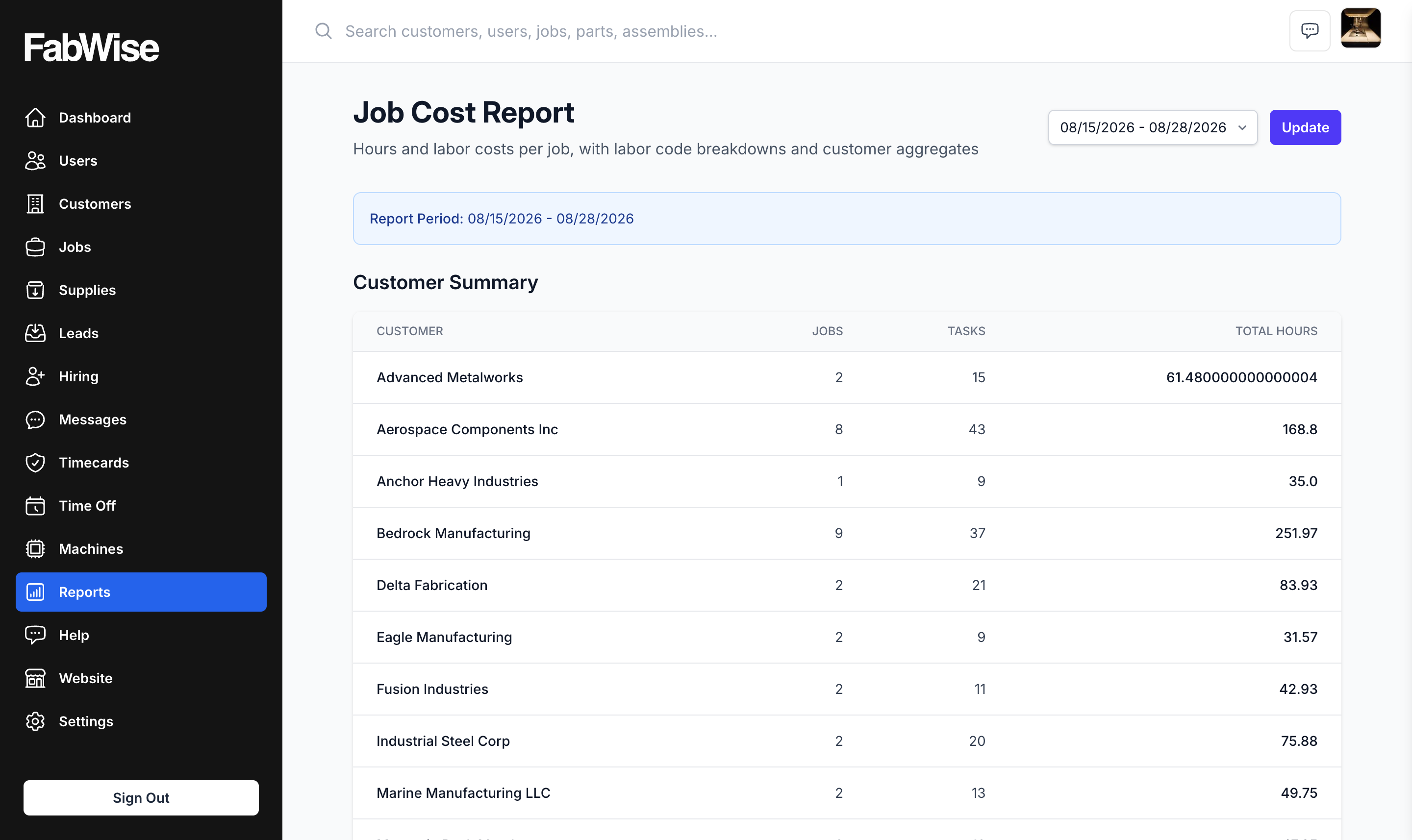
That data feeds the kind of report described above: hours to date by task, hours remaining against budget, projected completion cost. A shop manager looking at an active job can see whether it's on track or burning toward an overrun — while there's still time to do something about it.
Labor tracking is the mechanism. Time tracking at the job and task level is the data source. The report is the output.
FabWise doesn't do accounting, generate invoices, or replace your accounting system. It captures the labor side of job cost data accurately so whatever reporting layer sits above it — whether that's a spreadsheet, an ERP, or a job management system — starts from correct inputs rather than reconstructed approximations.
What the Report Doesn't Need to Show
Worth being direct about what a job cost report at this level doesn't have to include:
Material cost. FabWise tracks labor, not materials. Steel, consumables, and outsourced work stay in whatever you already use to buy them — a purchasing system, an ERP, or a spreadsheet. That's a deliberate boundary: labor is the cost most shops can't see clearly, and it's the one a time-tracking system is actually positioned to get right. A shop running an ERP combines FabWise's labor data with its own procurement detail in its reporting layer.
Overhead allocation. Overhead rate application — how much of rent, equipment, and administrative cost goes to each job — is an accounting function. It requires configuring allocation rates and applying them systematically. That's not what FabWise does. You get accurate labor hours; you apply overhead in your costing model.
Invoicing data. Whether a job has been invoiced, partially invoiced, or held is your billing system's domain. FabWise doesn't touch receivables.
The clean boundary matters. FabWise solves the data collection problem — getting accurate labor hours into a system without reconstruction. The analysis that sits on top of those hours is yours to build in the tools you already use for costing and accounting.
Building the Report: Practical Steps
If you're setting up a job cost reporting process for a fab shop, the sequence that works:
Define jobs and tasks in FabWise before work starts. Workers can only clock into jobs that exist. The setup step is creating job records as orders come in, with the task types you want to track (welding, fitting, finishing, etc.).
Let workers clock in at the job and task level. This is where the data is created. Every clock-in generates an attributed time record. Every clock-out closes it. The time tracking is continuous, not reconstructed.
Export hours by job and task for the reporting period. FabWise exports hours per worker, per job, per task. Take that export into your costing spreadsheet or ERP.
Apply burdened rates. Multiply hours by your fully burdened labor rate per role. That's your job labor cost for the period.
Combine with material cost from purchasing. Add material cost from your procurement records to get total job cost.
Compare to estimate. That's the variance. If you're looking at a job mid-run, it's your projected overrun or underrun. At close, it's your final margin outcome.
The report isn't complicated. The hard part is having clean input data. That's what job-level time tracking solves.