
A shared kiosk terminal — one touchscreen on the shop floor, every worker taps their name — produces better time tracking data than individual logins in fabrication environments. Not because it's easier. Because it removes the specific friction points that cause workers to stop clocking in at shift start and batch-enter at week-end. This article explains why those friction points exist, why they're worse in fabrication than in office environments, and what good data actually requires.
The Individual Login Assumption Doesn't Hold on the Shop Floor
Individual login systems are designed around an assumption: each worker has their own device, logs in once at the start of their shift, and logs out once at the end. That assumption is true in an office. It breaks in a fabrication shop.
In most fab shops with 10–50 workers, the floor does not have individual devices for each employee. Workers share terminals, share machines, and move between stations throughout a shift. The individual login model responds to this reality in one of two ways:
- Shared credentials. Workers share a login because there isn't a device assigned to each of them. This eliminates job-level attribution entirely — you know hours were worked, not by whom.
- Login ceremony at a shared terminal. Workers log in individually at a shared terminal, which means the terminal needs to log out the previous user, accept the next user's credentials, then navigate to the clock-in screen. In a shop running three shifts and 20 workers per shift, this adds up.
Both paths degrade data quality. Shared credentials destroy attribution at the worker level. Login ceremony at a shared terminal creates friction that workers route around — typically by skipping clock-in at the start of the shift and reconstructing time at the end of the week.
NIST's Manufacturing USA network has documented that shop floor technology adoption rates drop sharply when interface complexity increases — particularly for workers wearing PPE, working in noisy environments, or transitioning between physical tasks. The interface has to fit the environment. A login screen does not.
Why Batching Is the Real Data Quality Problem
When workers reconstruct time at the end of the week — or when a manager reconstructs it for them — the output is estimation, not capture. The shop floor time tracking record shows plausible hours rather than actual hours.
In a shop running multiple concurrent jobs, estimation accumulates specific errors:
- Job attribution drift. Workers remember the job they spent the most time on. Hours on secondary jobs get absorbed into the primary. Jobs that received partial labor look cheaper than they were.
- Missing short segments. A worker who spent 45 minutes on Job A, moved to Job B for the afternoon, then came back to Job A for 30 minutes at end of shift will often reconstruct this as "all day on Job B." The two A segments disappear.
- Clock-out timing blur. End-of-week reconstruction rounds shift end times. A worker who left at 4:47 PM on Tuesday is likely to reconstruct that as "left at 5" unless there's a specific reason to remember the exact time.
These aren't worker honesty problems. They're memory problems. The human brain doesn't retain precise time boundaries across a five-day shift week, especially in a physical, high-task environment.
The practical consequence: your labor tracking data is systematically biased toward the jobs workers remember most prominently, and systematically underreports labor on jobs that received fragmented time across a shift.
What the Shared Terminal Model Actually Does
A shared kiosk terminal solves the login friction problem by eliminating individual authentication from the clock-in flow. Workers identify themselves by tapping their name and entering a PIN — without managing their own account credentials on a shared device.
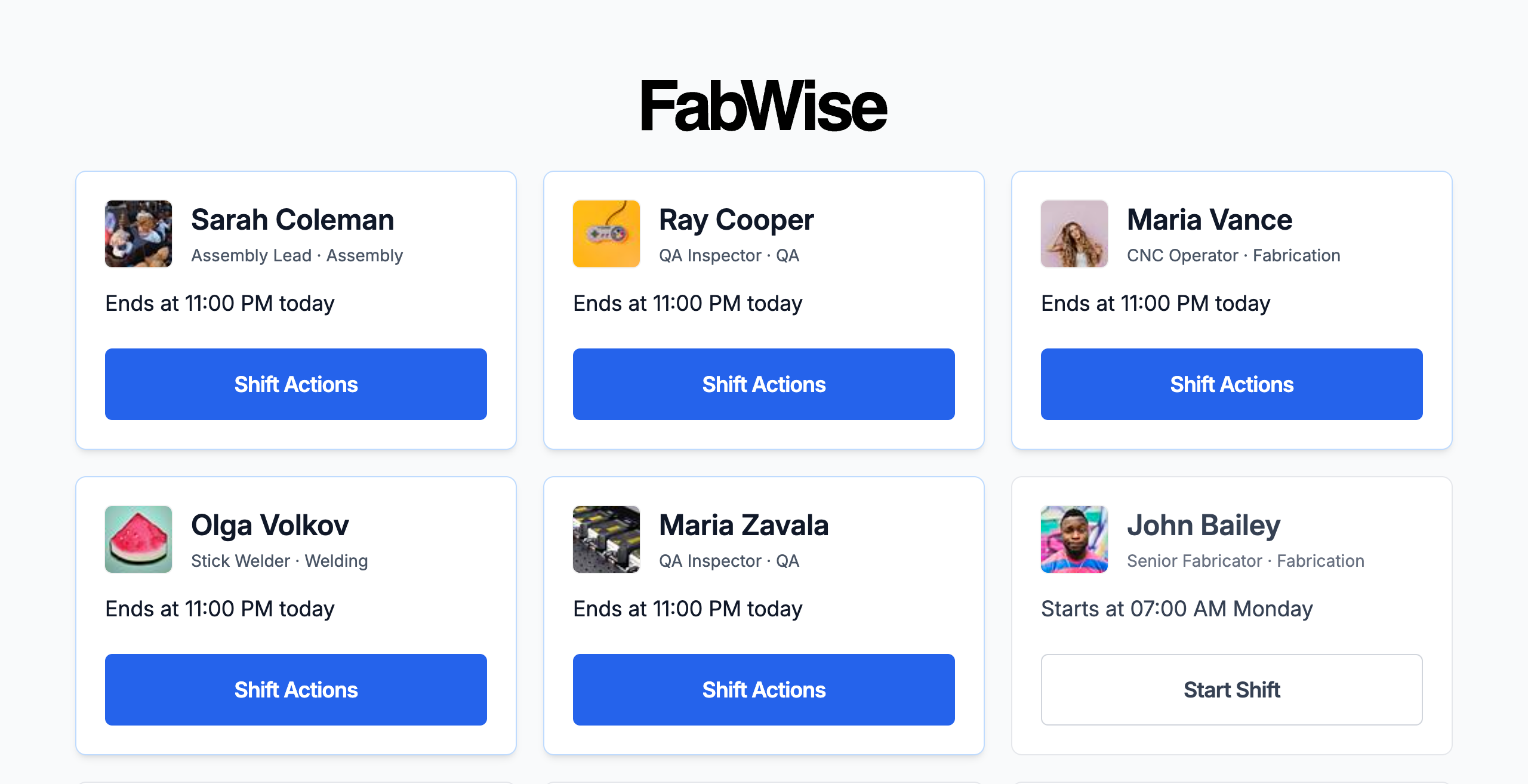
The critical difference: the terminal is not an individual device acting as a shared device. It is purpose-built for the shared-terminal model. After each clock-in, it returns to the selection screen. There is no persistent session to manage, no logout step, no credential entry.
The resulting clock-in sequence for a shared terminal looks like this:
- Worker walks to the terminal
- Worker taps their name and enters their PIN
- Worker confirms the shift and taps Start Shift
- Terminal returns to the worker list
Elapsed time: under 20 seconds. The kiosk deliberately captures identity and time only — job and task attribution happens at the workstation, where the work is, so the clock-in itself stays fast. Compare this to the individual login sequence at a shared device: find the logout button, confirm logout, enter username, enter password, navigate to the clock-in screen, clock in. Elapsed time: 60–90 seconds. In a shop environment, that extra minute is the difference between workers doing it every time and workers doing it when they remember.
The National Association of Manufacturers has noted that operational friction in shop floor processes compounds across shifts — a 90-second delay that happens 40 times per day across two shifts costs more than just the clock time. Workers develop workarounds that become embedded in shop culture and are difficult to reverse.
Clock-Out and Mid-Shift Job Switches
Mid-shift job switches are handled the same way — at the point of work. In FabWise, a worker who moves from Job A to Job B taps the new job and task at the workstation; the previous segment closes with the current timestamp, and both segments are recorded with precise start and end times. The kiosk's shift stays continuous underneath.
This is where the data quality difference is most visible. Individual login systems typically don't support mid-shift job switches at all — there's no interface for it, and the workaround is reconstruction. A capture model built for multi-job shifts treats the job switch as a first-class action.
At the end of a shift, the worker taps End Shift at the kiosk. The final segment closes. The shift record contains every segment with start time, end time, worker, job, and task. There's nothing to reconstruct.
Supervisor Review and Corrections
Accurate capture doesn't mean perfect capture. Workers will select the wrong job, forget to clock back in after a break, or end a segment at the wrong time. These errors need to be correctable by a supervisor without altering the original record.
A shared terminal model paired with a supervisor interface handles this through the time tracking correction workflow: the supervisor attaches a correction to the record, noting the adjusted value and reason. The original capture is preserved. The adjustment is auditable — who made it, when, and why.
This distinction matters. The original tap record reflects what the worker did. The correction reflects what the supervisor confirmed should have happened. Blending them into a single edited record loses information that's often relevant during a dispute or audit.
What This Means for Data at Pay Period Close
When time tracking data is captured in real time through a shared terminal — not reconstructed at week-end — the pay period close process is substantially simpler. The admin reviews flagged records (missed clock-outs, unusual segment lengths, uncorrected errors), approves or adjusts as needed, and closes the period.
What's not in that process: reconciliation. There's no step where someone calls workers to clarify when they actually left on Tuesday. The record says 4:47 PM because the worker tapped clock out at 4:47 PM.
That reconciliation step, in shops that rely on reconstruction, is where most payroll data errors enter the system. Removing it removes the errors.
The Honest Constraint
FabWise handles clock-in, job attribution, and shift record capture. A shared terminal reduces the friction that causes workers to skip real-time capture. Better capture produces better records. Better records feed accurate labor hours into job costing — see job costing for how approved shift hours translate to cost-per-job.
What FabWise does not do: calculate pay, classify overtime, enforce meal break compliance, or replace your payroll provider. Those calculations happen downstream, in whatever payroll system you run, after you export approved hours. The export is accurate because the capture was accurate. That's the entire value chain.
If your shop is currently running end-of-week time reconstruction and you want to see what real-time shared terminal capture looks like for your operation, book a demo with the FabWise team.