
Running payroll for a fabrication shop involves two distinct systems doing two distinct jobs. Your time tracking system captures hours. Your payroll provider takes those hours, applies rates, calculates overtime, handles deductions, and processes direct deposit. The handoff between the two systems is where most fabrication shops lose time and introduce errors. This article walks through each step of that process and explains exactly where things break down when the handoff is manual.
The Full Process, Step by Step
A clean payroll run in a fabrication shop follows this sequence:
Step 1 — Workers clock in and out throughout the pay period.
Each shift starts with a clock-in event: worker identified, job selected, task selected, time recorded. Each shift ends with a clock-out. Mid-shift job switches create additional segments within the same shift. The result is a set of time records — one per work segment — with precise start and end timestamps, worker attribution, job attribution, and task type.
Step 2 — Admin reviews shift records during the period and at period close.
Supervisors and admins review flagged records throughout the pay period: missed clock-outs, segments of unusual length, records where the wrong job was selected and a correction is needed. At period close, they do a final review pass, approve corrected records, and confirm the period is ready for export.
Step 3 — Export file is generated.
The time tracking system produces a formatted file — CSV or a provider-specific format — containing approved hours per worker for the period. This is the handoff artifact. Everything your payroll provider needs to do its job is in this file.
Step 4 — File is uploaded to the payroll provider.
The admin uploads the export to whichever provider the shop uses. The provider ingests the hours.
Step 5 — Payroll provider calculates pay.
This is where overtime calculation, tax withholding, benefits deductions, garnishments, and direct deposit scheduling happen. The payroll provider owns all of it. The hours you uploaded are the input; the paycheck is the output.
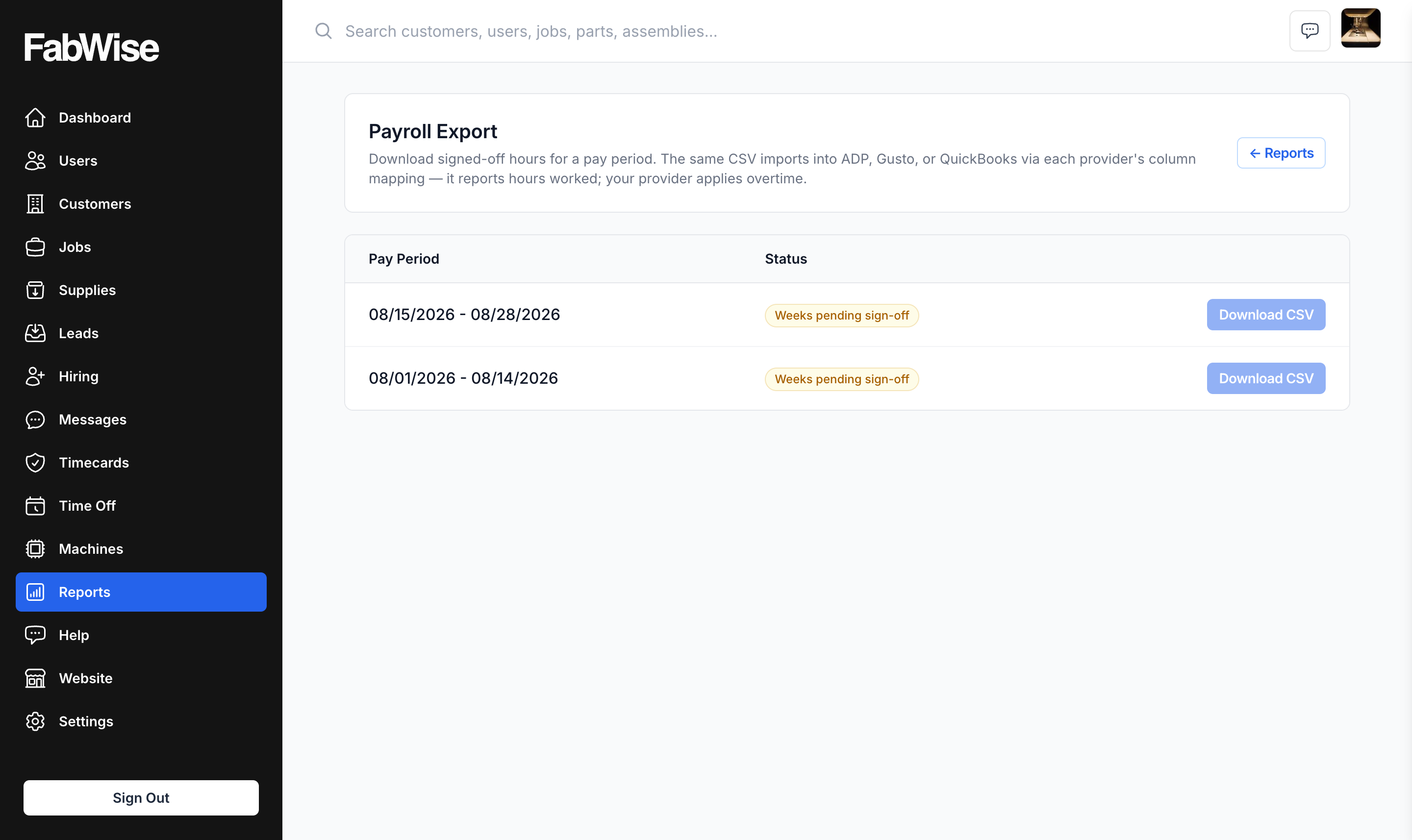
FabWise handles Steps 1 through 3. Steps 4 and 5 belong to your payroll provider. That boundary is not a limitation — it's the correct division of responsibility. Overtime calculation and tax compliance require specialized payroll software, state-by-state rule sets, and compliance infrastructure that a time tracking tool should not try to replicate.
Where Errors Enter Without Integrated Time Tracking
Shops not using integrated time tracking don't have Step 3 — they have a reconciliation step instead. That reconciliation step is where the errors are.
The American Payroll Association has reported that manual payroll processing error rates average between 1% and 8% of total payroll, and that payroll errors cost organizations an average of $291 per error to correct when accounting for staff time, corrections processing, and potential compliance exposure. For a 20-person fabrication shop running bi-weekly payroll, even a 2% error rate means roughly one payroll error per period.
The reconciliation step works like this: at pay period close, someone — usually an admin or shop manager — collects time data from wherever it lives (paper time sheets, a spreadsheet, a generic time tracking app that doesn't connect to job records) and assembles it into the format the payroll provider needs. This involves:
- Tracking down workers whose records are incomplete or missing
- Resolving discrepancies between what the time sheet says and what the supervisor recalls
- Manually adding up hours across multiple days and shifts
- Converting the totals into the upload format by hand
Each of those steps is an opportunity to introduce an error. And unlike a system-generated export, a manually assembled file has no automatic validation — if you enter 80 hours for a worker who worked 40, nothing flags it until payroll runs.
SHRM's research on payroll processing costs has found that the administrative burden of manual time collection and payroll preparation is one of the top cost drivers in hourly-workforce payroll operations, often exceeding the direct cost of the payroll provider itself for shops in the 10–50 employee range.
The Reconciliation Step Is the Problem
It's worth being specific about what the reconciliation step costs, because shops that have lived with it often assume it's unavoidable.
Time cost. In a 20-person shop running bi-weekly payroll, manual reconciliation typically takes 2–4 hours per pay period. At a loaded administrative rate of $35/hour, that's $140–$280 per period, or $3,640–$7,280 annually.
Accuracy cost. Manual assembly of time data introduces transcription errors, addition errors, and missing-record errors. The export generated by an integrated system has none of these — the hours in the file are the hours that were approved in the system, with no manual transcription between them.
Dispute cost. When a worker disputes a paycheck, the shop needs to reconstruct what actually happened. In a manual system, "what actually happened" is whatever was written on the time sheet or remembered by the supervisor. In an integrated system, the record shows the clock-in timestamp, the clock-out timestamp, any corrections applied, and who applied them. Disputes resolve faster because the audit trail is complete.
What the Export Actually Contains
When FabWise generates a payroll export, the file contains the approved time records for the period: each worker's name, their total hours for the period, and the breakdown of those hours by shift or day (depending on the format your provider needs). The hours have already passed through the admin review step — flagged records have been resolved, corrections have been applied, and the admin has signed off on the period.
The labor tracking record and the payroll export draw from the same approved data. The hours your payroll provider receives are the same hours that feed your job costing. There's no version where payroll shows 42 hours and job costing shows 40 — it's one source of truth.
What the export does not contain: overtime classification, pay rates, or tax calculation inputs. Those belong to the payroll provider. You're sending hours; the provider is doing the math.
Connecting Time Tracking to Payroll Without Replacing Your Provider
Shops sometimes ask whether integrated time tracking means switching payroll providers. It doesn't. FabWise exports one CSV per pay period that any payroll system can import. Your payroll provider continues to handle everything it currently handles; the only thing that changes is where your hours come from.
The time tracking system captures the hours. The export carries them to the provider. The provider runs payroll. That division of labor is cleaner than trying to collapse all three steps into one tool — payroll software that tries to also be a shop floor time tracker usually does both jobs poorly.
For shops using shop time card software that doesn't produce a clean export, the reconciliation step described above is typically the gap. The question to ask: is your admin spending time every pay period assembling hours that a system should be assembling automatically? If yes, that's the problem the export step solves.
Common Questions
Does FabWise calculate overtime? No. Overtime is calculated by your payroll provider based on the hours in the export. FabWise captures and exports the hours; your provider applies the overtime rules for your state and employee classifications.
What if a worker clocks in at the wrong job? The supervisor correction workflow lets admins attach a correction to any record — adjusting job attribution, segment start/end time, or task type — while preserving the original capture. The approved record (after correction) is what goes into the export.
What format does the export use? One CSV per pay period, with a stable set of columns: employee, pay period start and end, regular hours, and time off by type. There is no provider-specific format — payroll systems import hours through their own column-mapping step, which you configure once. The goal is zero manual manipulation between the export and the upload.
Who approves the period before export? The admin or payroll manager reviews the period in FabWise, resolves flagged records, and triggers the close. The export is generated from the approved record set. The approval step is explicit — you don't accidentally export a period that hasn't been reviewed.
The Bottom Line
The fabrication shop payroll process has a clean structure: capture hours, review and approve, export, upload, let the payroll provider do its job. The version of this process that breaks is the one with a manual reconciliation step between capture and export. Removing that step removes the errors, reduces the administrative time, and gives you an audit trail that holds up when a record is disputed.
FabWise is purpose-built for the first three steps of that process in a fabrication shop environment. If you want to see what period close looks like without the reconciliation step, book a demo with the team.