
Why it matters
Most questions are faster to ask Foreman — it's already looking at your account and it answers immediately. But some things need a person: a billing question, a judgment call, something that looks wrong and you want a human to confirm it.
When that happens you shouldn't have to re-type everything you just explained. Opening a ticket from a Foreman conversation attaches a summary of that conversation automatically, so the person who picks it up starts with the context instead of asking you to start over.
How it works
Ask Foreman for a person and it offers you a Contact support button. Press it and you get a short form: a subject and a description. That's it — there's no queue to pick, no priority to guess at, no category dropdown.
If you opened the ticket from a Foreman conversation, a summary of that conversation is attached for our team to read. You never see the summary and you don't have to write it. Anything that looks like personal information — email addresses, phone numbers, card numbers — is stripped out before it's attached.
Once the ticket is open, it's listed on the Help page under Talk to a person, and that's where you go back to read it. When someone on our team replies, the reply appears in the ticket and you get an email letting you know. The email deliberately doesn't contain the reply or the subject of your ticket — just a link. Your support conversation stays inside FabWise, where it's behind your login, instead of sitting in an inbox.
The email is the part that reaches you; the ticket page is the part you read. A reply shows up the next time you open the ticket — the page doesn't refresh itself while you're looking at it.
The Help page also tells you where things stand without you opening anything: each ticket in the list carries a status, so you can see at a glance whether there's a reply waiting.
Where to find it
- Page: Help
- Path: Help → Talk to a person, which has a Create Ticket button and — once you've opened at least one ticket — the list of your tickets right there on the page
- Who can see it: Anyone who can sign in to the admin app. You only ever see your own tickets — not your coworkers'.
Two other ways in:
- From Foreman. Ask for a person and Foreman offers a Contact support button right in the conversation.
- From the FabWise Support page. Sign in to open a ticket takes you straight to the form.
Demo accounts can't open tickets — there's no real shop behind a demo, so there's nobody to reply. Foreman says so instead of offering the button.
What you'll see
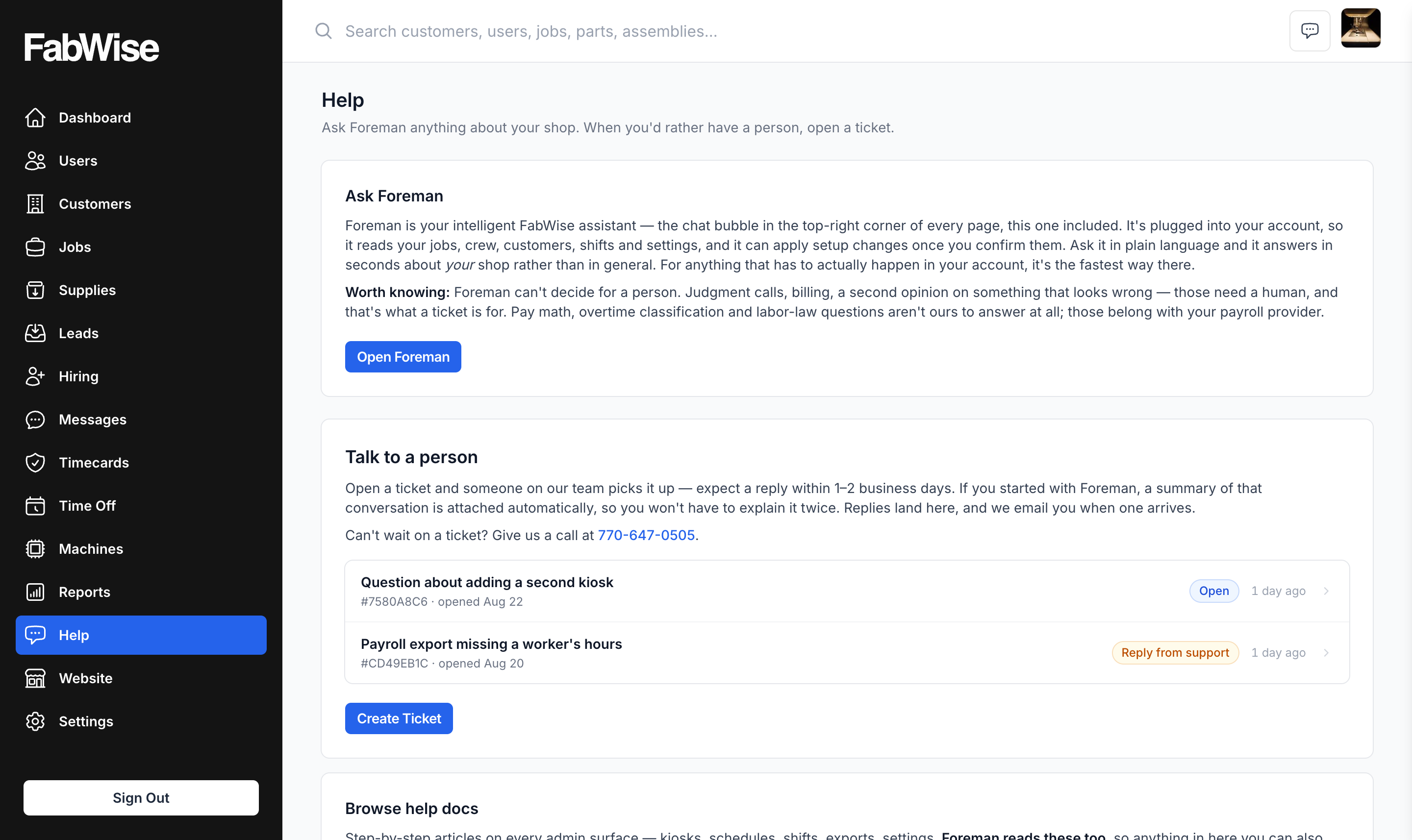
The Help page
Three ways to get an answer, in the order you'd usually want them.
Ask Foreman comes first. It explains what Foreman is, what it can reach in your account, and — the part worth reading — what it can't decide for you. Open Foreman opens the chat right there; it's the same conversation as the bubble in the top-right corner of every page, because that's where Foreman already is.
Talk to a person comes second, and it carries the answer to the question you probably opened the page with: your tickets are listed right inside it, most recently active first, each one with a status. If someone has replied, that ticket's status says so and the row takes you straight into the thread. If you've never opened a ticket, there's no list at all — just the Create Ticket button.
Browse help docs comes last: the same articles Foreman reads from, in a tab of their own. Anything in there you can also just ask Foreman about, and it'll answer against your actual account instead of in general.
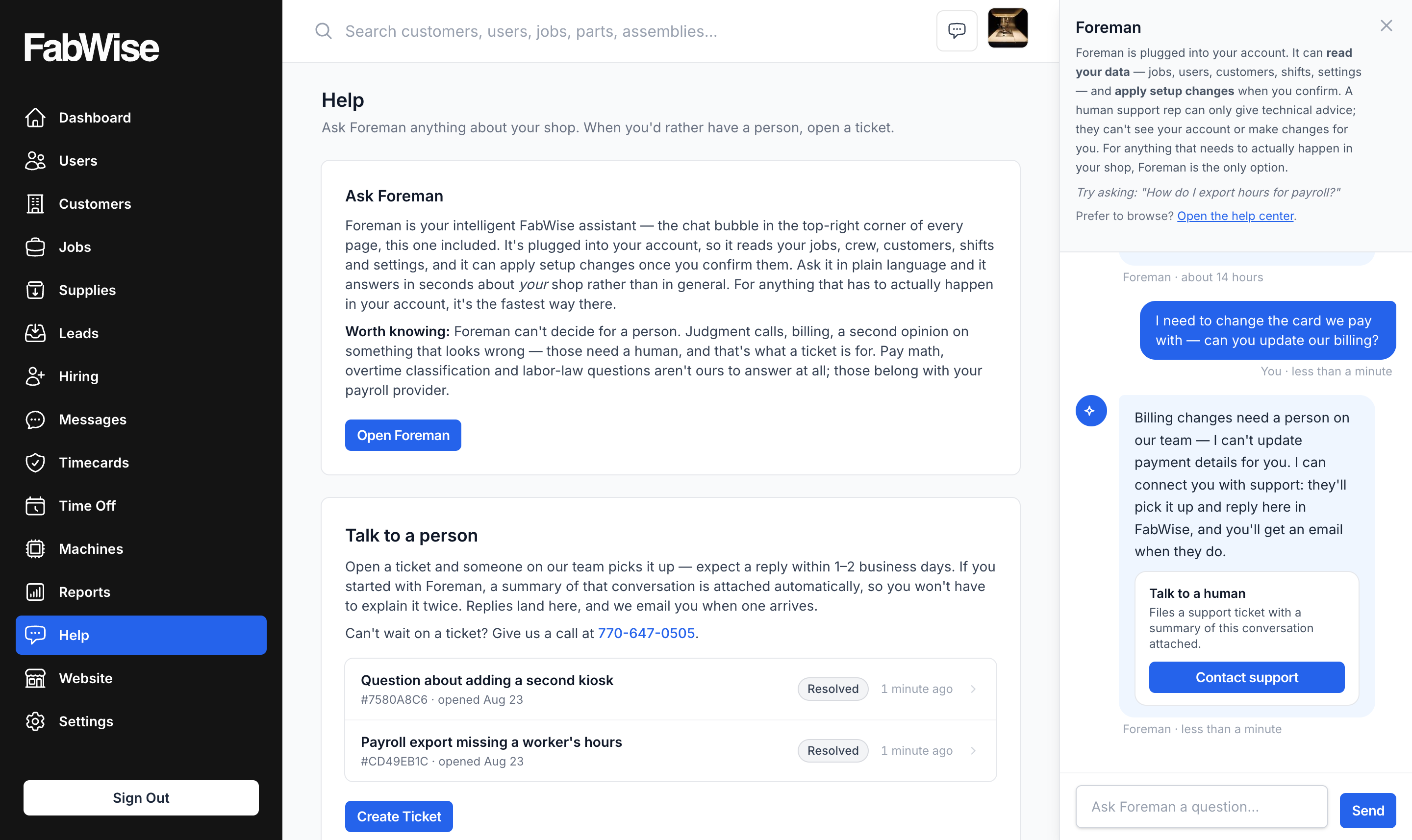
The Contact support button
Foreman's reply reads normally, and a small card sits underneath it: Talk to a human, with a Contact support button. The reply still makes sense on its own — on the iPhone app, where there's no card, you get the same answer in words.
If you already have a ticket open, Foreman points you at that one instead of offering to start another. One conversation with our team is easier to follow than three.
The form
Two fields:
- Subject — already filled in, based on what you and Foreman were talking about. It's a starting point, not a decision. It's often a sentence rather than a title, because it's drawn from your own words. Rewrite it to whatever you'd call the problem.
- What's going on? — the part that matters. This becomes the first message on the ticket, so write it the way you'd say it out loud.
If the ticket carries a Foreman conversation, a note above the fields tells you the summary is being attached. If you started from the Support page instead, there's no note, because there's no conversation to attach.
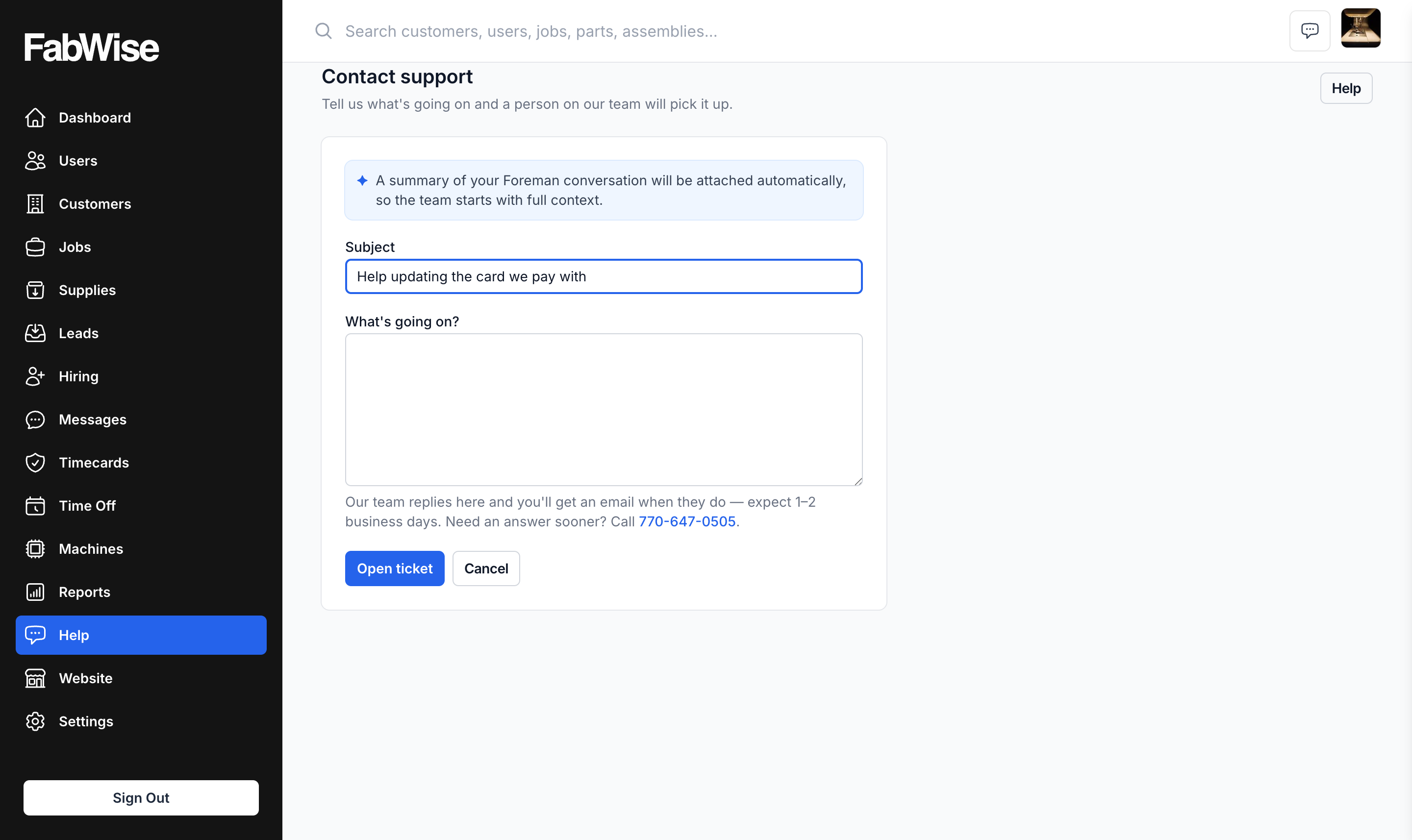
Press Open ticket. If you came from a chat, Foreman drops a line into the conversation — Support ticket #4F82A1C9 opened — that links back to the ticket.
Your tickets
Listed inside Talk to a person, most recently active first, each with a short reference number and a status:
- Open — filed, and we haven't replied yet.
- Reply from support — there's something new for you to read.
- Resolved — we've closed it out.
The ticket itself
The conversation reads like a chat. Your messages are on the right; replies from our team are on the left with the name of the person who wrote them. There's a reply box at the bottom — type, press Send, and it lands in the same thread.
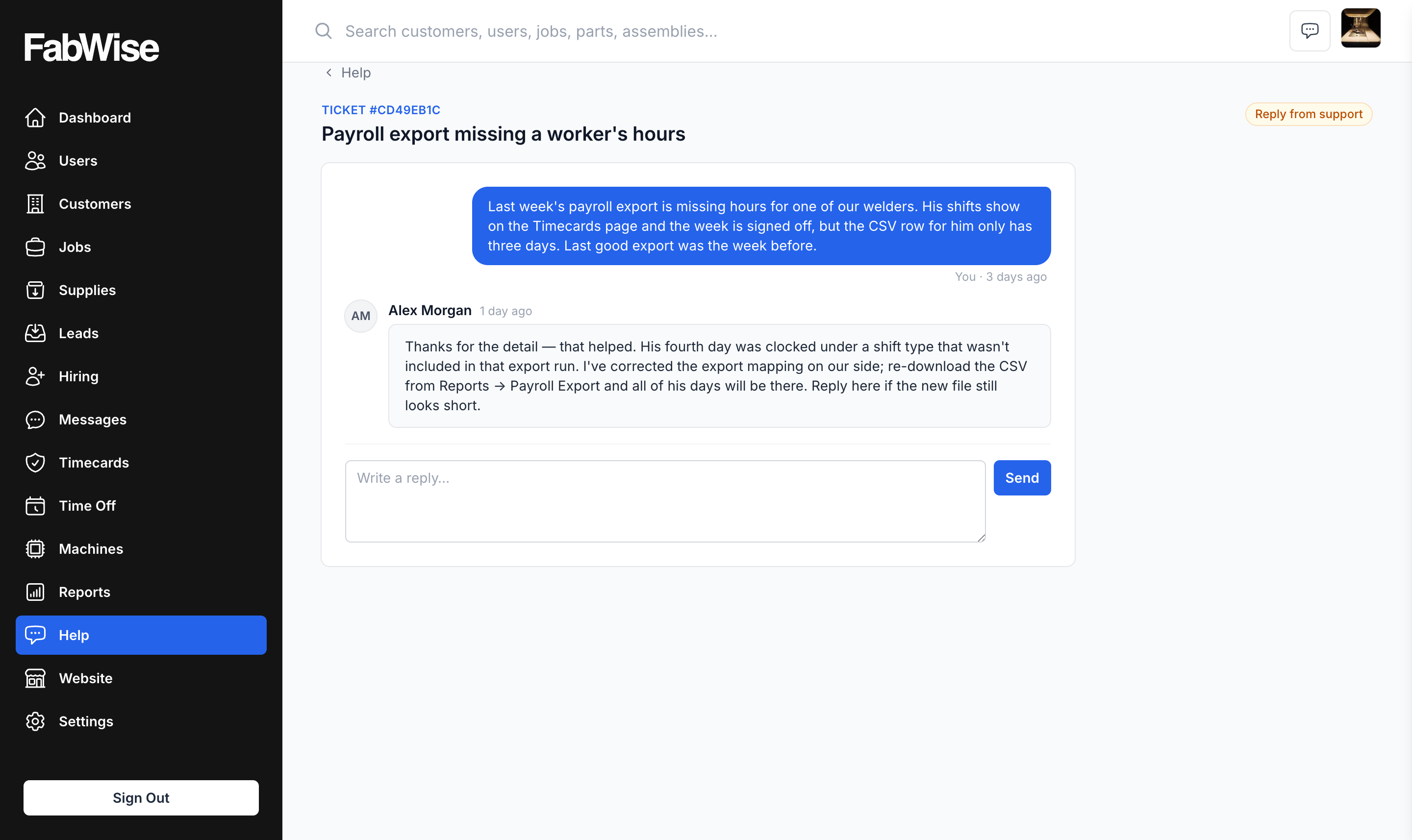
A resolved ticket shows the full conversation but no reply box. If it isn't actually sorted, open a new ticket and say so — we'd rather pick it back up than have you sit on it.
What to do
- Try Foreman first. It answers instantly and it can see your account, which a person can't. If it can't help, it will offer to open a ticket for you.
- Fix the subject if it reads oddly. It's prefilled from your own words to save you a step, not because it got it right.
- Say what you expected and what happened instead. "The payroll export downloads but opens blank, last good one was Friday" gets a useful reply faster than "export broken."
- Reply in the ticket, not to the email. The email is only a notification — replying to it won't reach the thread.
- Come back when the email arrives. That's your cue that there's something to read.
Common questions
Q: Can my coworkers see my tickets?
A: No. The Help page lists only tickets you opened.
Q: Why is the subject already filled in, and why does it read like a sentence?
A: It's taken from what you were just discussing with Foreman, so you don't start from a blank box. It's your own words coming back to you, which means it often reads like a sentence rather than a title. It's an ordinary text field — change it to anything you like before you open the ticket.
Q: Will a reply pop up while I have the ticket open?
A: No. Replies appear when you open or reload the ticket. That's what the email is for — it tells you there's something waiting, and links you straight to it.
Q: Why doesn't the notification email tell me what the reply says?
A: On purpose. Your support conversation may include details about your shop, and email isn't a private place to keep them. The email tells you there's a reply and links you to it; the conversation stays behind your login.
Q: What exactly gets attached from my Foreman conversation?
A: A short summary of the recent part of the conversation, written for the person answering you, with personal information stripped out. It's attached to the ticket for our team only — it never appears in the thread you read.
Q: I opened the ticket from the Support page, not from a chat. Is anything attached?
A: No. There's no conversation to summarize, so the ticket is just what you wrote.
Q: Can I still email support@fabwise.app?
A: Yes, and it's the right way in if you can't sign in. But email arrives without any account context — nobody answering it can see your shop's data. If you can sign in, a ticket gets you a better answer.
Related
Last updated: 2026-07-27