
Tracking labor hours per job means knowing — precisely — how many hours each worker spent on each customer project or production order. Not "how many hours did the shop run today" and not "how many hours did each person work this week." Both are useful. Neither tells you whether Job #4821 came in on budget.
This guide covers what effective job-level tracking requires, why generic time tracking tools fall short, and what a purpose-built approach looks like for fabrication environments.
What You're Actually Trying to Know
Before choosing a tracking method, be clear about what question you're answering. Job-level labor tracking answers a specific set of questions:
- How many hours went to this job, total and by task?
- Which operations (welding, fitting, machining) ran over their estimated hours?
- Which jobs are driving overtime this week?
- Is my labor estimate for this job type holding up or drifting?
These questions are downstream of quoting, job costing, and scheduling. If you can't answer them, you're estimating margin rather than calculating it.
The Core Requirement: Attribution at Clock-In
Every hour needs to be attributed to a job at the moment it's worked — not estimated or reconstructed afterward.
This means your workers need a way to say, at the start of each work segment: "I'm working on Job #4821, welding task." When they clock out or switch jobs, the segment closes with a timestamp on both ends. The result is a time record with three pieces of information:
- Worker — who performed the labor
- Job — which customer project or production order received the hours
- Task — what type of work was performed
Three-layer attribution is what separates job-level tracking from generic time tracking. Without it, you have payroll data. With it, you have labor tracking that feeds job costing directly.
Why Generic Time Tracking Tools Fail at This
Generic time tracking tools — whether it's a card swipe system, a spreadsheet, or a general-purpose app — typically capture two of the three layers: worker and time. Job attribution either doesn't exist, or it's added as an afterthought (a dropdown that workers ignore, a notes field that's inconsistently filled, a code to enter that nobody remembers).
The result is end-of-week reconstruction: the shop manager or job cost accountant tries to figure out which jobs each person worked on and for how long, using partial information. In a shop where workers move between two or three jobs in a single shift, reconstruction is estimation. Estimation accumulates error. Accumulated error is the difference between a shop that knows its margin and one that guesses.
A second failure mode: generic tools aren't designed for multi-job shifts. A worker who spends three hours on Job A, two hours on Job B, and comes back to Job A for an hour creates three work segments. Most tools aren't built to record that; workers end up logging the dominant job and absorbing the rest as unattributed time.
Setting Up Job-Level Tracking: What's Required
To track labor hours per job reliably, you need:
A job list workers can select from. The job has to be in the system before a worker can clock into it. This means the person managing jobs — typically a shop admin or estimator — needs to create job records as orders come in, and workers need to see an active job list that's current.
A clock-in interface that captures job at the start of each segment. Workers shouldn't be reconstructing their time at the end of a shift. The selection happens at clock-in: worker identifies themselves, selects the job, selects the task, and the segment starts. Clock-out closes the segment.
A mechanism for multi-job shifts. Workers should be able to clock out of one job and clock into another without ending their workday. The system should record both segments as part of the same shift, maintaining the worker's continuous presence while tracking where the time went.
A correction workflow with audit trail. Workers make mistakes — wrong job selected, forgot to clock out, incorrect task. A supervisor needs to be able to attach a correction to any record, noting the adjusted value and the reason. The original capture should be preserved. See the labor tracking documentation for how audit trails work in practice.
Common Setups in Fabrication Shops
Shared kiosk terminals. The most common setup in shops with 5–50 workers is one or more shared touch-screen terminals on the shop floor. Workers identify themselves (PIN, badge scan, or similar), select a job from the active list, select a task, and clock in. The terminal is accessible from the floor without requiring each worker to have their own device. A shop floor time clock designed for this use case handles gloves, noise, and multi-user flows.
Individual workstation access. Shops with desk-based workers or workers who operate fixed machines may use per-user workstation access instead of or in addition to kiosk terminals. The worker logs in at their station, selects job and task, and clocks in.
Hybrid. Most shops use both: floor workers use the kiosk, office staff and supervisors use workstation access.
What Good Data Looks Like
When job-level attribution is working correctly, the admin view shows:
- Every worker's current status (clocked in or out), current job, and accumulated hours for the shift
- Hours per job for the current period, broken down by task
- Workers who are scheduled but not clocked in (absence flag)
- Records flagged for supervisor review (missed clock-out, unusual segment length)
At pay period close, the same records feed payroll export: approved hours per worker per period, formatted for your payroll provider. The job costing view shows hours per job per period, ready to apply burdened labor rates.
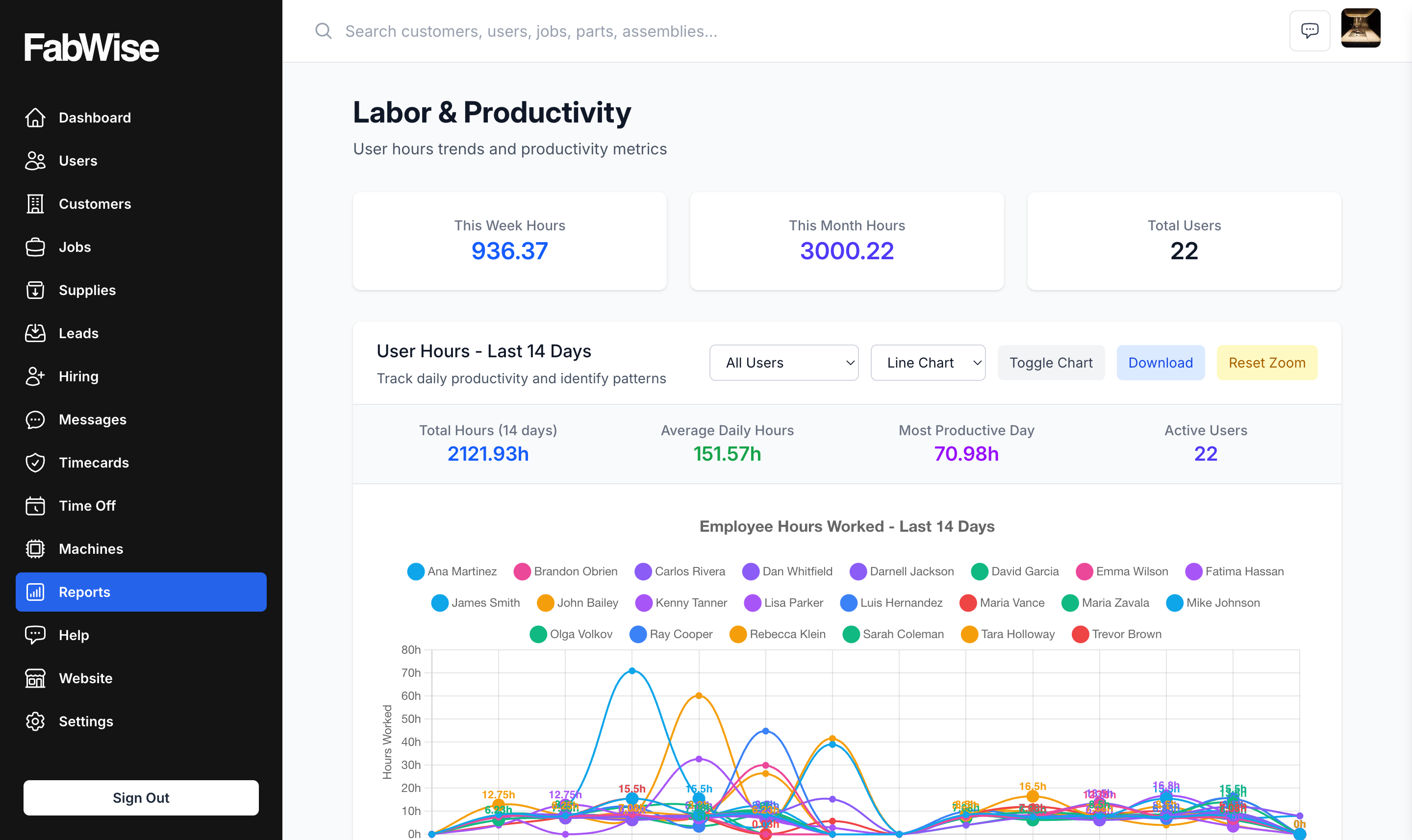
The data doesn't require a reconciliation step. It comes out of the system the way it went in — attributed, timestamped, and auditable.
Is This Worth the Process Change?
For shops with 10+ workers running multiple concurrent jobs, the answer is consistently yes. The shops that know their labor cost per job are the ones that can quote accurately, identify which operations are consistently running over, and make pricing decisions based on data rather than instinct.
The shops that don't have this data often don't realize what they're missing until a job that looked profitable turns out to have eaten 40% more labor than estimated — and by then the invoice is out.
FabWise is designed for this specific use case. If you're evaluating whether it fits your operation, book a demo with the team.