
Labor cost per job is the product of two numbers: hours worked on the job and the burdened labor rate for those hours. The calculation itself is straightforward. What most fabrication shops get wrong is the input data — specifically, the hours.
This guide covers the correct formula, why burdened rate matters, and what accurate hour capture looks like in practice.
The Formula
Labor cost per job = Total job hours × Burdened labor rate
If a job took 47 hours and your burdened rate for the workers involved averages $38/hr:
47 × $38 = $1,786 labor cost
That's it. But two things trip shops up: they use base wage instead of burdened rate, and they use estimated rather than actual hours. Both errors compound.
Burdened Rate vs. Base Wage
The base wage is what you pay the worker per hour. The burdened rate is what the worker actually costs you — base wage plus employer-side payroll taxes, benefits, workers' compensation insurance, and any other employer costs tied to that labor hour.
The labor burden typically adds 25–40% to base wages. A machinist earning $28/hr base costs $35–$39/hr fully burdened. Using base wage to calculate labor cost understates your true cost by 25–40% on every job.
This matters most in quoting. If you quote based on base wages, your labor estimate is 25–40% too low before accounting for any other error. Over many jobs, you're systematically underpricing your labor and eroding margin without seeing it in any individual transaction.
For job costing, the calculation should always use burdened rates. If your payroll provider or HR system tracks burdened costs, use those figures. If not, you can calculate a burdened rate per role or per worker by dividing total annual labor costs (including all employer-side costs) by total annual hours worked.
Actual Hours vs. Estimated Hours
Most job cost formulas are run on estimated hours — the hours the estimator thought the job would take when they put together the quote. Estimated hours are the right input at quote time. They're the wrong input for costing actual jobs.
To know whether Job #4821 was profitable, you need the actual hours. How many hours did your workers actually spend on that job? Not "the welder was on the floor for 8 hours and probably did mostly that job" — actual hours, attributed to the job, with a timestamp.
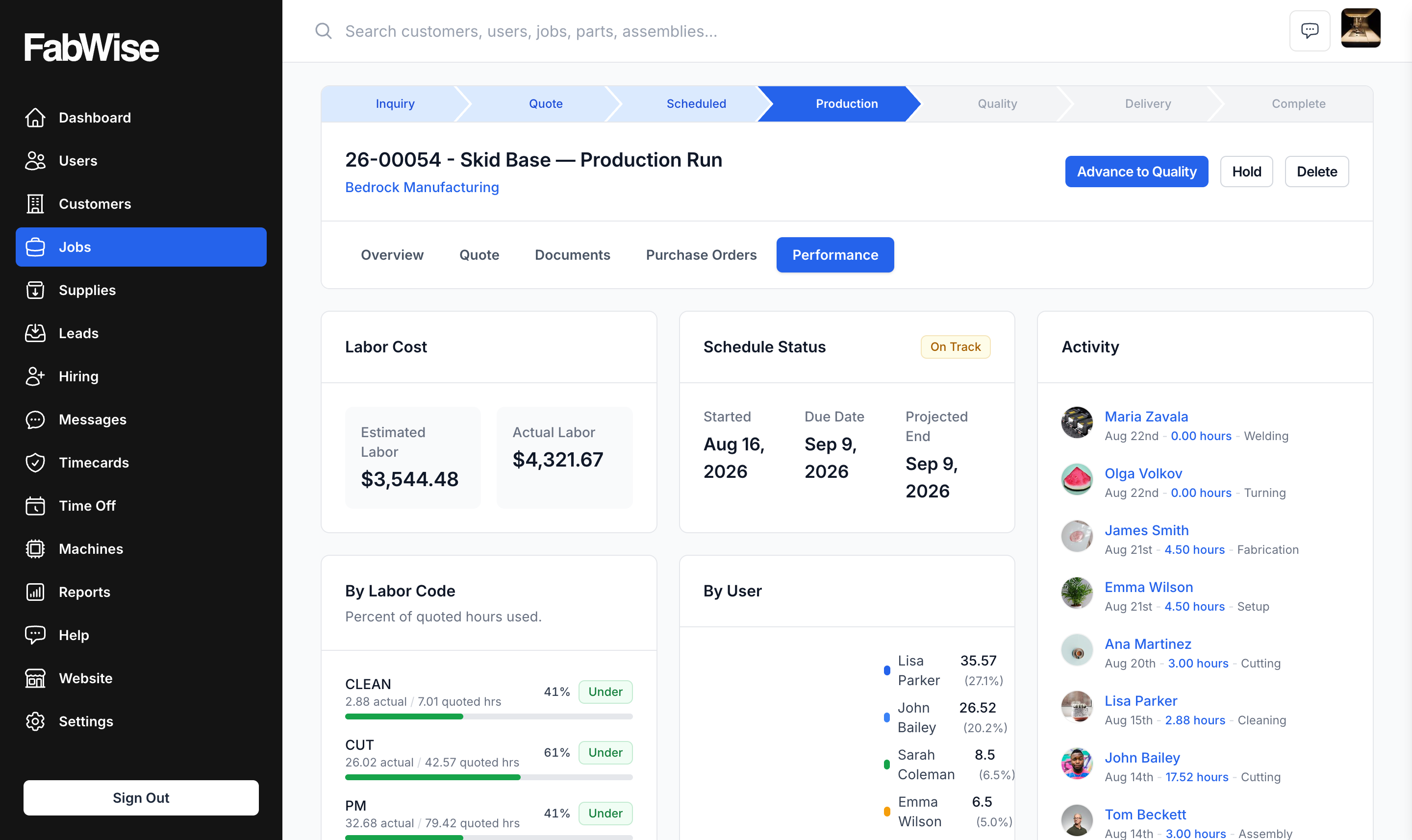
This is the problem labor tracking is designed to solve. When every work segment is attributed to a job at clock-in, actual hours come out of the system without reconstruction. You compare estimated to actual by job, by task, by operation — and you see exactly where estimates are holding and where they're drifting.
Breaking Down Labor Cost by Task
The aggregate hours-per-job number is useful for margin analysis. The hours-per-task breakdown is useful for improving estimates.
A job that took 12 hours over budget might have been:
- Welding: on budget
- Fitting: 4 hours over
- Rework: 8 hours over (no rework was estimated)
You can't see that in the aggregate. With task-level attribution in your time records, you can. Over multiple similar jobs, patterns emerge: fitting consistently runs 20% over on this job type, rework is systematically unestimated. That's information you can act on — adjust your fitting estimate, add a rework buffer for jobs with complex geometry.
FabWise captures time at three layers: worker, job, and task. The export gives you hours broken down by all three, by any time period. You apply your burdened rates; the costing is on your terms.
What You Need to Run This Calculation
Three things:
- Actual hours per job — from your time tracking system, attributed at clock-in, not reconstructed
- Burdened labor rates per role or per worker — from your payroll data or a calculated blended rate
- A simple calculation — multiply and sum
FabWise provides the first. The second comes from your payroll provider or HR system. The third is a spreadsheet or your job costing module.
FabWise deliberately doesn't process pay rates or calculate burdened costs — that's your payroll provider's domain, and they do it correctly. What FabWise does is ensure the hours are accurate. See the payroll export documentation for how approved time records flow to your payroll provider.
Variance Analysis: Estimated vs. Actual
Once you have actual hours per job, the most useful thing to do is compare them to estimated hours systematically. For each job that closes:
Labor variance = Actual labor cost − Estimated labor cost
                = (Actual hours × Burdened rate) − (Estimated hours × Burdened rate)
                = (Actual hours − Estimated hours) × Burdened rate
A positive variance means the job ran over on labor. A negative variance means it came in under. Over time, tracking this by job type, customer, and operation shows you where your estimating model is accurate and where it isn't.
Shops that do this analysis consistently report that their estimates improve within 90–120 days of having real data. The estimator stops guessing and starts adjusting based on what similar jobs actually cost.
Margin Calculation
Labor cost per job feeds into the full margin calculation:
Job margin = Revenue − (Material cost + Labor cost + Overhead allocation)
Labor cost is often the largest and most variable line item. Material costs are known before the job starts. Overhead allocation is typically a fixed formula. Labor is where actual performance differs from estimate.
If your labor cost calculations have been based on base wages and estimated hours, your reported margins are overstated. The correction isn't dramatic — most shops find a 3–8 percentage point difference — but at volume, that's the difference between a profitable year and a breakeven one.
Getting accurate labor cost per job requires accurate hour attribution. That's the starting point.