Workstation — Per-Worker Time Tracking at Every Machine
FabWise Workstation is the individual capture surface: one worker, one screen, usually mounted at a machine or a bench. Where the kiosk is a shared terminal the whole crew passes through, the workstation belongs to the person standing at it. They see their own shift, their own task list, and their own hours — and they clock in and out without waiting behind anyone.
Both surfaces write to the same shift record. A shop can run kiosk-only, workstation-only, or both at once, and the week reconciles into one set of hours regardless.
When a Shared Kiosk Isn't the Right Fit
A shared terminal by the door works well when the crew arrives together and clocks in together. It stops working well in three situations fab shops hit constantly:
Long walks. If the press brake is 200 feet from the entrance, a job change means a 400-foot round trip. Operators stop tagging job changes accurately, and labor lands on the wrong job.
Staggered work. When operators move between jobs several times a shift, the queue at a single terminal becomes real friction. Friction produces guessing, and guessing produces bad job costs.
Personal context. A shared screen can't show one worker their task list, their remaining hours, or a message from the office — everything on it is visible to whoever walks up next.
The workstation solves all three by putting the surface where the work is.
What an Operator Sees
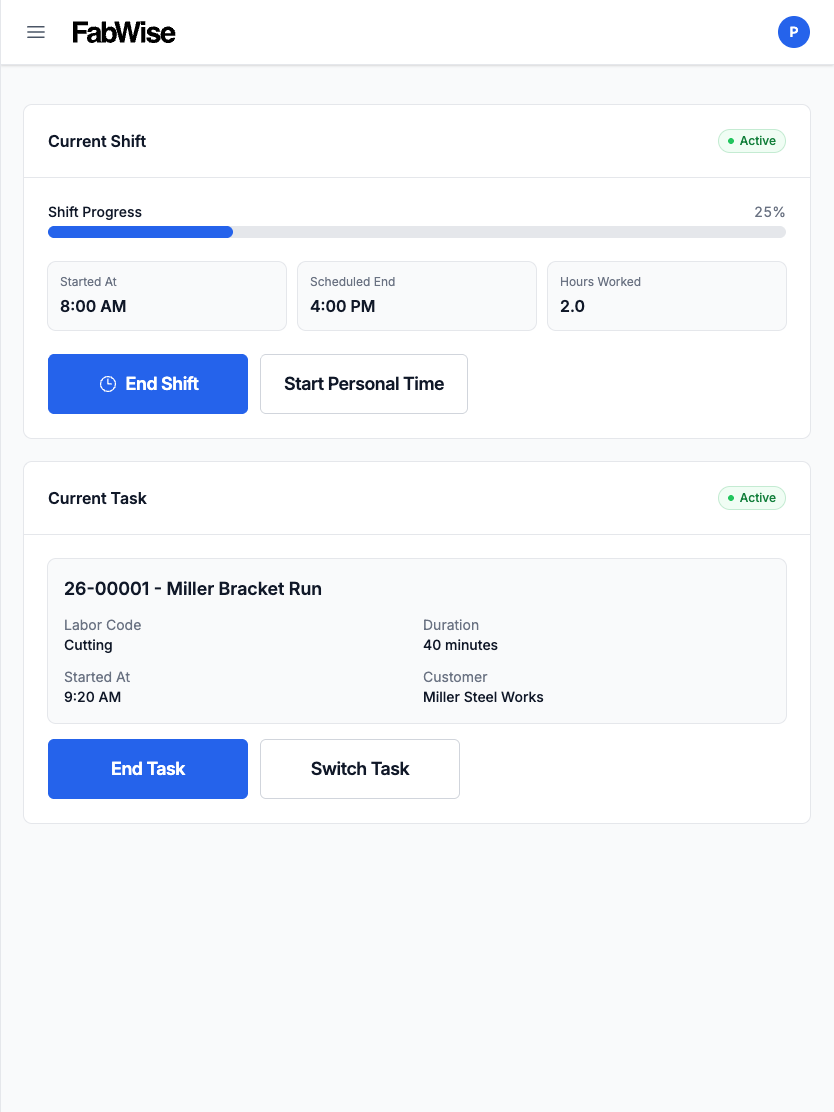
The workstation opens to that worker's current state, not a menu:
- Their shift — clocked in or out, when it started, what's been recorded so far
- Their current task — what they're on, with one tap to switch jobs or tasks
- Their task list — what's been assigned to them, so "what am I on next" doesn't require finding a supervisor
- Their meal break — declared at clock-out, the same declaration flow the kiosk uses
Clock-in tags the job at the source, exactly as the kiosk does. Hours land on the job as they're worked, which is what makes job costing accurate without a Friday reconciliation pass.
Installs to the Home Screen, Not From an App Store
Workstation is a Progressive Web App. It runs in the tablet's browser, and it installs to the home screen with a FabWise icon that opens full-screen with no browser bar — the experience of a native app without a download, an app store account, or a device-management rollout.
That distinction matters on a shop floor. There is no per-device app version to keep current, no store review delay between a fix and the floor having it, and no restriction on what hardware you buy. If the tablet has a modern browser, it runs Workstation.
Setup instructions for iPhone and iPad are in the documentation.
One Capture, Two Interfaces
FabWise treats the kiosk and the workstation as presentation differences over a single shared capture contract — not as two products that happen to sync. The rounding interval, the meal-break rules, the job-tagging requirement, and the shift math are defined once and enforced identically on both.
This is deliberate, and it's enforced in the codebase rather than left to discipline: divergence between the two surfaces is treated as a defect, not a configuration option. For a shop, the practical consequence is that you can move a worker from the kiosk to a workstation mid-week and their hours don't change shape.
See labor tracking for how captured hours attribute to worker, job, and task.
Messages From the Office
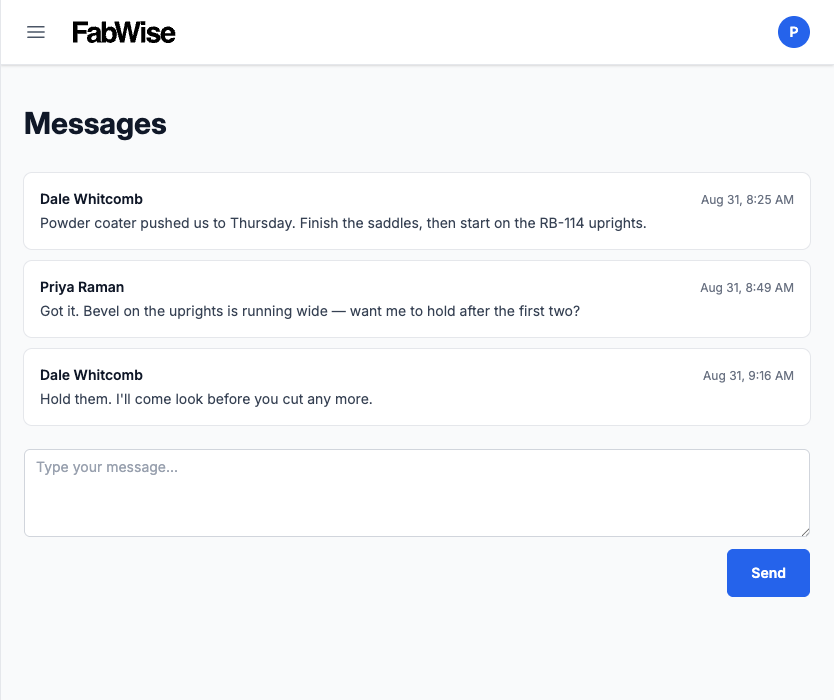
Shops that turn it on can send messages from the admin console to a specific worker's workstation — a job change, a priority shift, a "see me before you leave." The worker sees an unread badge on their own screen and reads it when they next interact with the device.
Two design decisions are worth stating plainly, because they're the ones shops ask about:
Messages are read when the worker actually touches the screen, never merely when the page renders. A tablet that wakes overnight does not silently mark an unread message as read. The office sees an accurate read state.
There is no worker-facing push for manager messages. The unread badge is the delivery. Nobody's evening gets interrupted by the shop.
Messaging is off by default and enabled per account by an admin.
Notifications Workers Actually Want
Workstation can send web push notifications to the worker's device for a small, deliberate set of events — a new job assignment, a shop-wide broadcast, an end-of-day task summary. Each is individually preference-controlled by the worker, and the whole channel is off by default until an admin turns it on for the account.
The restraint is the point. A notification stream that cries wolf gets silenced within a week, and then the one that mattered gets missed too.
Follows the Worker's Language
Workstation runs in English or Spanish, reading the same preference the worker set — at the kiosk, at their own station, or wherever they last chose it. Set once, honored everywhere.
The shop sets a default and each worker overrides it. On a mixed floor that's the difference between a setting and an accommodation.
Supervisor Review Still Applies
Nothing captured at a workstation bypasses review. Exceptions — a missing clock-out, a meal break that doesn't match the schedule, an unusual shift length — surface to supervisors the same way kiosk captures do, and corrections are recorded alongside the original capture rather than overwriting it. The original tap record is preserved permanently; a correction is a separate event with its own actor and timestamp.
See time tracking for the full review and correction workflow, and payroll export for how approved hours reach your payroll system.